Support
FAQ & Troubleshooting
Answers to common questions about playback, performance, and data storage.
Playback & Compatibility
Troubleshooting for browsers, platforms, and playback issues.
Due to Brave's privacy protection, Twitch's anti-bot system (Kasada) detects the Brave browser signature and rejects requests, causing Twitch streams to fail (frozen screen or errors). This can be fixed by installing the ModHeader extension to override the browser signature.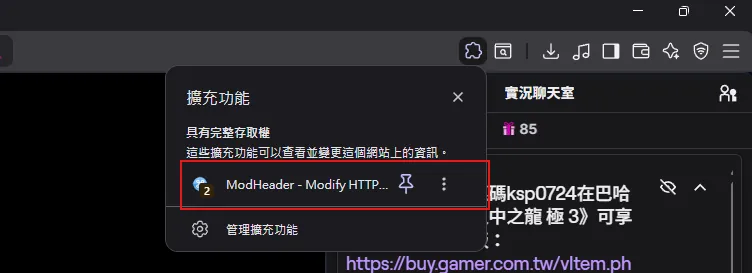
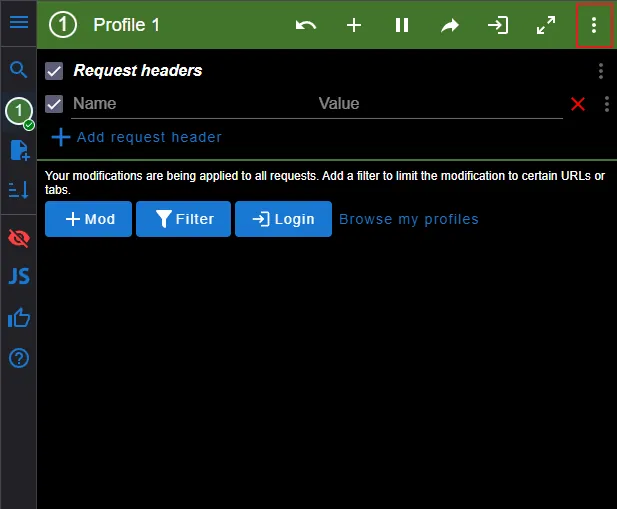
1Find the installed ModHeader extension in your browser's extension list
2Open ModHeader and click the menu button (three dots icon) in the top right
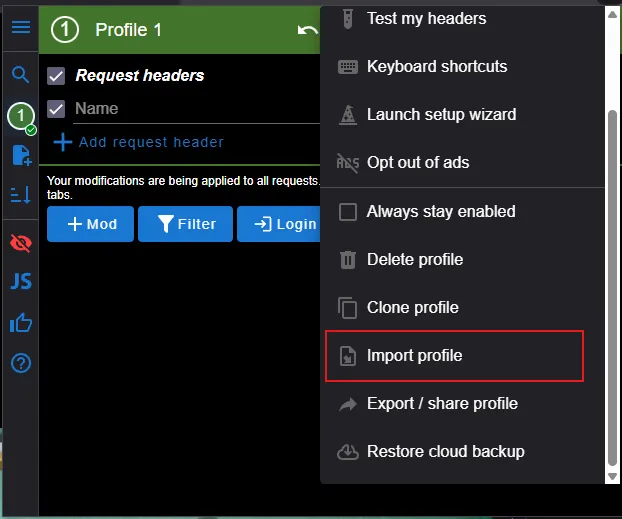
3Find and click "Import profile" in the menu
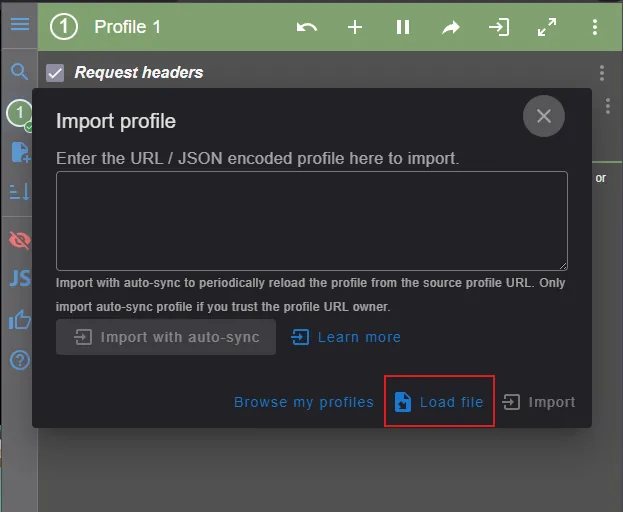
4Click "Load file" and select the downloaded twitch.json profile to import
TipAfter importing, refresh the Twitch page to start streaming normally. This setting only affects browser signatures for Twitch-related requests and won't impact other websites.
Some YouTube videos or streams are restricted from embedding by content creators and cannot be played on third-party platforms.
Currently supports Twitch and YouTube Live. More platforms may be added in the future.
Your favorite Twitch and YouTube channels are checked automatically when you open the site, when you enter the canvas and every 25 minutes after that; turning on “Auto-detect live status in background” in settings checks every 5 minutes instead. Live channels show a green dot in your favorites (viewer counts are not shown). YouTube channels are throttled, so one can take 15 minutes or more to turn green after going live.
Performance & Data
Common questions about performance tuning, data storage, and layout placeholders.
Playing several high-quality streams at once uses a lot of CPU and bandwidth. There is no site-wide quality setting — lower the quality from each player’s own gear menu, or play fewer streams at once; when 2 or more YouTube streams are playing, use “Pause Others” on the warning. Twitch drops to the lowest quality automatically after the tab has been in the background for 30 seconds. Press F3 for a performance panel showing frame rate and memory.
Your favorites, lists, tags, settings and custom layouts are saved in your browser and are still there next time. The canvas you are watching is not saved permanently: reloading clears it, and if you come back within 10 minutes you are asked whether to restore your last session. To move to another device, use Favorites Manager → Backup & Restore (the backup includes your custom layouts).
Press + on the dynamic island and choose a combo (stream + chat), a stream window or a chat window to add an empty window to the canvas — handy as a placeholder while you plan the layout. An empty stream window has its own search box and a drop-down of live favorites; an empty chat window lets you pick which stream on the canvas to show the chat for.
The Dynamic Island’s YouTube channel search matches names against the channels already indexed on our site — it does not search all of YouTube in real time. If a channel does not show up, it has usually not been added yet; you can suggest it on the Stream Schedule. When you pick a result, the site first checks whether the channel is live: if it is, it is added to the canvas; if not, it is added to your favorites so you can load it once it goes live.
TipIf a channel you want never appears, let us know on Discord and we'll add it to the catalog.
Still can't find an answer?
Join our Discord community and ask us — we're happy to help.